Blog
Tech Essentials for Modern Professionals in 2026

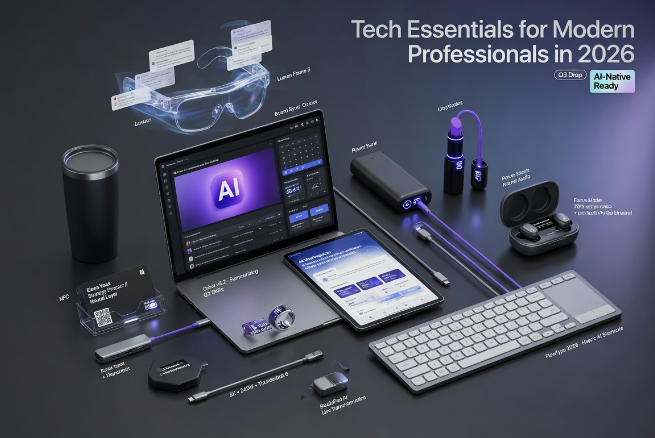
The modern professional setup is no longer the four walls of your office desk. Instead, work happens everywhere: at home, in coworking spaces, on campus, on the road, and even while on the go. As hybrid work and flexible study environments continue to evolve, having the right set of tech tools is essential for professionals to stay productive, focused, and efficient.
Freelancers, remote workers, entrepreneurs, students, and digital nomads can all benefit from powerful, time-saving devices and accessories to supercharge their workflow. From faster computers to smarter productivity apps, these tech essentials of 2026 are designed to help modern professionals work smarter, collaborate better, and stay organized.
Today we’ll discover the most essential tech tools for professionals in 2026 and see how they can improve work and study efficiency.
Top Essential Tech Products for Professionals
Essential tech for professional work isn’t the same as for personal use. Productivity requires more screen real estate, better connectivity, portability, and smarter organization systems. For professionals using technology on the job, it is worth investing in specialized products to perform at your best.
Let’s take a look at the top tech essentials for modern professionals and see how they can boost your productivity.
| Tech Essential | Main Purpose | Productivity Benefit |
| Laptop with AI optimization | Core work device | Faster processing and multitasking |
| portable monitor | Extended screen workspace | Better multitasking and workflow |
| Wireless keyboard & mouse | Comfortable control | Improved speed and ergonomics |
| Noise-canceling headphones | Focus and meetings | Better concentration |
| Cloud storage tools | File access anywhere | Easy collaboration |
| Smart desk lighting | Eye comfort | Reduced strain during long sessions |
| Fast charging power bank | On-the-go backup | Uninterrupted work |
1. Laptop: The Core Work Device
A powerful laptop remains the starting point for building a professional tech setup. In 2026, business users and students need computers with:
- High RAM (16GB+)
- Large SSD storage (512GB or higher)
- Fast processors with AI integration
- Long battery life (10+ hours)
Options that combine portability with processing power and battery life are best for professionals on the move. Ultrabooks are a popular choice for those who often work outside their home office or change work locations frequently.
2. Portable monitor: The Growing Essential
One of the best upgrades for professional work in 2026 is a portable monitor. A second screen offers huge productivity gains by allowing you to:
- Keep meetings open on one screen
- Work on projects on the other
- Reference spreadsheets side by side
- Monitor analytics dashboards
- Edit documents and media more easily
Remote workers, field researchers, and mobile business people especially love having the flexibility to work with dual screens without the bulk of traditional setups.
3. Wireless keyboard & mouse: Productivity Comfort
Typing and navigation comfort are not to be underestimated for long work sessions. A wireless keyboard and mouse setup will improve:
- Speed and precision
- Wrist and hand ergonomics
- Desk organization
- Wire clutter
Foldable wireless keyboards and compact mice are also popular for on-the-go professionals.
4. Noise-canceling headphones: Focus and Meetings
Noise distractions are one of the main productivity killers. Noise-canceling headphones will help you:
- Block out ambient noise
- Attend virtual meetings without interruption
- Improve audio quality
- Focus on tasks in shared workspaces
5. Smart LED desk lighting: Eye comfort
Visual comfort is a big factor, too, as professionals spend more time in front of screens. Adjustable smart desk lights now offer:
- Brightness control
- Blue light reduction
- Color temperature adjustment
- Motion sensor for hands-free operation
NxtLED products are becoming very popular with the modern workforce. Good desk lighting can make a big difference to concentration levels and reduce headaches and eye strain for long work sessions.
6. Cloud-based productivity tools: Seamless collaboration
Hardware is not everything. Software plays a critical role in modern work and study environments. In 2026, cloud-based tools are a must-have for professionals to:
- Manage documents
- Streamline workflows
- Collaborate with colleagues
- Store and access files instantly
Cloud-first productivity includes the use of apps and services for:
- File collaboration and editing
- Project management
- Note-taking
- Shared team calendars
- File synchronization
7. Fast charging accessories: On-the-go power backup
Battery anxiety is a real concern when working outside. Fast charging power banks and adapters are must-have accessories to avoid running out of power while on the go. Fast charging tech has made it easier to keep all devices charged with USB-C support.
Highly recommended for:
- Travel professionals and digital nomads
- Students working in libraries or cafes
- Field researchers
- Freelancers working outside
Best Tech Setup for Professionals
Workstation Type Recommended Setup
Remote Work Laptop + portable monitor + noise-canceling headphones
Study Setup Laptop + smart LED desk light + wireless keyboard
Travel Office Ultrabook + fast charging power bank + portable monitor
Content Creation Laptop + second display + cloud storage tools
Remote Work Essentials
For professionals working remotely, the best setup includes:
– Fast laptop + portable monitor + noise-canceling headphones
Study Station Essentials
For studying and homework, the most productive setup involves:
– Fast laptop + smart LED desk light + wireless keyboard
Travel Office Setup
Business people on the go need these three key essentials:
– Lightweight ultrabook + fast charging power bank + portable monitor
Content Creator Kit
For blogging, writing, or producing digital media, the best tech setup is:
– Fast laptop + second screen + cloud storage tools
The Impact of the Right Tools on Work Efficiency
The right tech set up can improve work and study performance in several key areas:
- Enhanced multitasking: Dual screens and faster computers reduce task-switching time.
- Improved focus: Noise-canceling and smart lighting allow better concentration.
- Quicker collaboration: Cloud tools and file-sharing apps make communication instant.
- Reduced fatigue: Ergonomic devices reduce stress on the body.
Future Work Productivity Tools
As we look to the future, other emerging tools that many professionals are now adopting include:
- AI workflow assistants
- Smart glasses displays
- Voice-to-text apps
- Foldable screens
- Ultra-portable dual monitors
The future of modern work is mobile, flexible, and tech-dependent.
FAQs
What is the most important tech essential for professionals?
– A laptop (or ultrabook) with AI-optimized processing and a secondary screen are the key essentials.
Why should professionals use a portable monitor?
– A portable monitor provides more space for multitasking and reduces interruptions, without losing portability.
Is the UPERFECT portable monitor good for professional use?
– Yes, the UPERFECT portable monitor is a great choice for remote professionals thanks to its design, display, and features.
How does lighting improve productivity?
– Smart lighting (blue light reduction, brightness, etc.) increases eye comfort, which results in less fatigue.
Why is NxtLED so relevant for modern workspaces?
– NxtLED lighting helps create efficient workspaces with lighting that professionals don’t mind working long hours in.
Final Words on Work and Study Productivity Tools
The modern professional relies on more than a laptop to get their work done. Productivity now requires a complete ecosystem of devices, accessories, and smart tech tools. From a portable monitor to ergonomic devices and specialized lighting solutions like NxtLED, each tool can help improve the overall performance of a modern professional.
For those who want to stay productive in today’s competitive work environment, tech essentials are no longer optional, they are a necessity.


Do Watch Colors Match Seasons?

Choosing the Right Cavitation Machine: What Every Clinic Owner Should Know Before Buying

How to Spot a More Trustworthy Phone Tarot Service
Beware, the cult that victimized teenagers has brought its performances to Japan

How Does the FRM Exam Help Build a Career in Risk Analytics?

What Happens When You Stop Taking Ozempic For Weight Loss?

Generative Furniture Modeling Review 2026: Automating Prototyping Workflows
Why Healthcare Press Releases Need Regulatory Awareness
How to Turn Your Bahrain Registration Into a Competitive Advantage

Company License in Saudi Arabia: Matching Activity for UK Firms
Do Watch Colors Match Seasons?
Choosing the Right Cavitation Machine: What Every Clinic Owner Should Know Before Buying
How to Spot a More Trustworthy Phone Tarot Service
Beware, the cult that victimized teenagers has brought its performances to Japan
How Does the FRM Exam Help Build a Career in Risk Analytics?
What Happens When You Stop Taking Ozempic For Weight Loss?
Generative Furniture Modeling Review 2026: Automating Prototyping Workflows
Why Healthcare Press Releases Need Regulatory Awareness
How to Turn Your Bahrain Registration Into a Competitive Advantage
Company License in Saudi Arabia: Matching Activity for UK Firms

The Private World of Marina Pearl LeBlanc, Matt LeBlanc’s Only Child

What is Shoujo Ramune? The Comprehensive Guide

Who is Christina Erika Carandini Lee? Everything About Christopher Lee’s Daughter

Who is Amra Nor Jenkins? The Untold Story About Jeezy’s Daughter

The Untold Truth of William Mapel: A Deep Dive into His Personal Life

The Untold Story of Denika Kisty: Her Family, Net Worth, and More

The Rise of Ryan Nikolaos Sampras: From Humble Beginnings to Stardom

Who is Nicoletta Ruhl? Age, Family, Bio

William Givens Jensen Today: What We Know About Robin Givens’ Son

Who Is Stephanie Sarkisian? All You Need To Know AboutSteve Sarkisian’s Ex-Wife
-
 Celebrity1 year ago
The Private World of Marina Pearl LeBlanc, Matt LeBlanc’s Only Child
-
 Entertainment2 years ago
What is Shoujo Ramune? The Comprehensive Guide
-
 Celebrity2 years ago
Who is Christina Erika Carandini Lee? Everything About Christopher Lee’s Daughter
-
 Life Style2 years ago
Who is Amra Nor Jenkins? The Untold Story About Jeezy’s Daughter
-
 Celebrity2 years ago
The Untold Truth of William Mapel: A Deep Dive into His Personal Life
-
 Celebrity2 years ago
The Untold Story of Denika Kisty: Her Family, Net Worth, and More
-
 Celebrity2 years ago
The Rise of Ryan Nikolaos Sampras: From Humble Beginnings to Stardom
-
 Life Style2 years ago
Who is Nicoletta Ruhl? Age, Family, Bio